Showing posts with label research. Show all posts

Tuesday, February 15, 2022

FamilySearch Place Names Chaos

A few months ago I posted an article about FamilySearch's "standardized place names" introducing errors (see FamilySearch Introducing Errors) but not only does nothing seem to have been done to fix the errors, but they seem to be getting worse. 

I am not talking here about errors in indexing. There are many indexing errors, some of which give rise to place name errors, especially when the original document is not available to correct it. 

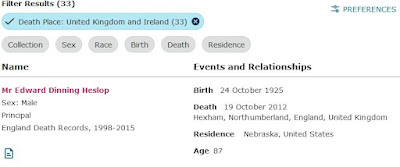
The errors I am talking about here are not indexing errors but algorithmic errors, when the place name in the index is correct, or almost correct, and FamilySearch's algorithm changes it to something wrong. 

Also, FamilySearch flags many correct place names as wrong,  with warnings like !Missing Standardized Death Place, which encourage users to change a correct place name to a wrong one.

These errors can destroy the hard work of indexers, and that of family historians who have contributed to FamilySearch Family Tree. These algorithms should never have been let loose on the database before being tested to avoid such errors. 


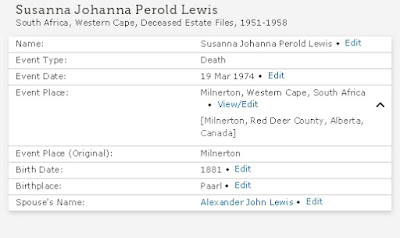
 This record, when attached to Family Tree, inserted the place name "Milnerton, Red Deer County, Alberta, Canada", which was altogether wrong. The error was not on the part of the indexer, nor on the part of the person who attached it to a record. The error was in the algorithm, which shifted the event not only to another country, but to a different continent. I copied this event to my RootsMagic database, and corrected the place to "Milnerton, Cape Province, South Africa" (which was more correct for the time of the event) and then copied it back to FamilySearch. But many people might just accept it, and copy the wrong place to their own family tree, and simply think that the family must have emigrated from South Africa to Canada. 

Here is another example:

In this case, it seems that large numbers of people who lived in Nebraska, USA, migrated to Northumberland, England, to die. The one shown above is just one example of many. 

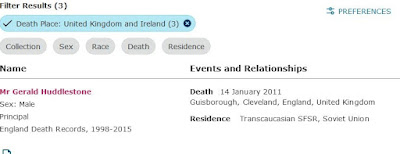
People in Trans-Caucasia, on the other hand, seemed to prefer to die in Cleveland, UK in the town of Guisborough:

These errors seem to be multiplying rapidly, and the longer the faulty algorithms stay in place, the more degraded the FamilySearch database will become.


Friday, October 29, 2021

FamilySearch introducing errors

Genealogists using FamilySearch should be aware that FamilySearch, like some other interactive genealogy web sites, has begun introducing automated errors in place names.

This is likely to affect the collaborative family tree on FamilySearch, and records copied from that to researchers' own family trees. Because the errors are automated,  they are likely to multiply rapidly, thus reducing the overall accuracy and qalue of the collaborative family tree and other records on FamilySearch. 

The errors appear to arise from the laudable desire to encourage the use of standardised place names, which makes it easier to search for places. The downside of this is that when non-standard but correct place names are changed into standardised but incorrect ones, it makes places and people much harder to find. 

One example is that in the 1841 Census of England, several people are shown as bring at St Martin, Essex. This refers to St Martin's parish in Colchester, Essex, but if one attaches such a census record as a source to a person in the collaborative tree, the FamilySearch software automatically changes the place to Chichester in Sussex, about 130 miles away. And if you then copy that record to your own family tree, the wrong place name will be copied too. 


It is, of course, possible to change it to the correct place and copy it back to FamilySearch, but many researchers, unless they have studied several generations of a family in a place, will be likely to leave it, and just assume (wrongly) that the family moved around a lot. 

One way to check in the instance I mentioned is that if the census record gives a street address, you can do a web search for the street in both towns. In this case, a search for Stockwell Street Colchester shows that there is such a street there, while searching for Stockwell Street in Chichester shows that there isn't one. But this might not work for common names like High Street or Main Street. 

Until the people at FamilySearch fix this bug, genealogists should keep a sharp lookout for erroneous place names. Standardising place names is not a bad idea, but the software should suggest such names to users, and not just change them willy nilly. 

Experienced genealogists might be capable of interpreting the various place names used by people like census enumerators, but there is no way that software programmers can interpret them, sight unseen, and they shouldn't even try. It is better to have an accurate but non-standard place name than one that is fully standardised, but wrong.


Monday, August 24, 2020

Getting the best out of FamilySearch

On several online forums I have been reading complaints from people who are upset because they "started their family tree" on FamilySearch, and then found that someone has changed it without their permission.
The first important thing to remember here is that the proper place for your family tree is on your computer at home, and not on a remote site. There is plenty of free genealogy software out there, and two of the best programs interact easily with FamilySearch. They are RootsMagic and Legacy Family Tree, both of which have free versions, and paid-for versions with extra features. Try the free ones first, and pay for the one you like best.
With either of these programs you can log in to FamilySearch and exchange information, one piece at a time. The only person who puts anything in your tree is you.
The tree on FamilySearch is a collaborative one, which means that it doesn't belong to anyone, and anyone can contribute, and obviously some contributions will be better than others.
But for the collaboration to work properly, you need to do a few things.
  • Register with FamilySearch and include your email address.
  • If you find information that differs from yours, think twice about changing it. Check the sources first, and only if you are certain, change it.
  • It is easier to create a duplicate person and merge them later than to merge two people only to discover that they are not the same, and then have to separate them.
  • In both RootsMagic and Legacy (and also in the online version). there is a Discussion section for disputed or unclear facts. Use it.
  • There is a record trail of everyone who made any changes. If someone made a change you disagree with, ask them about it. That's why including your email address is important -- you can contact them right away, and not leave a message on FamilySearch that they will only see the next time they log in.
Those are things you should always be doing on FamilySearch.

This is my method of working for a lot of things on FamilySearch.

I keep at least two family trees on my computer. One is my Research file, which includes a lot of speculative and unrelated information. So if there are two unrelated families with the same surname living in the same place at the same time, I colour the unrelated one blue in RootsMagic. But it's there for comparison, and for eliminating people you're already looked at and found to be unrelated.

If someone sends me a Gedcom file that links to someone in my family tree, I link them, then check them on FamilySearch by looking at the link person on FamilySearch family tree. Maybe someone else has already put in their spouse and kids. But don't just copy them to your tree; check the information and sources to see how accurate they are.
 I recently found a woman named Isabel Richardson born in 1813, married in 1821, had her first child in 1822. Think about that. She cannot be the right Isobel Richardson. So what did I do?
On the FamilySearch web site I clicked Search --> Records, and asked if there was an Isabel Richardson born in that area between 1793 and 1807 (based on the dates of her oldest and youngest children. There were several, but I couldn't determine which one she was. So I left it, but left a note in the Discussion section to say that I did not think the Isabel Richardson born in 1813 could be the mother of the eldest of the children, and left it there. And, of course, I checked to see if anyone else had said anything about it in the discussion section..
That's how collaborative research works -- you spot an error, you leave a warning to other researchers, so everyone should be helping everyone.
Or, having linked the person in my tree with one on FamilySearch, I may have a spouse and kids. If I'm reasonably certain off the accuracy, I copy them to FamilySearch, then go to the web site and look for research hints. If there aren't any, I go to the "Record-->Search" (see above) and search for one of them in the general or specific area. I usually add a year or two on either side of their given birth date, which often finds ones that the "hints" miss. If name, date and place match, then I add that source and info to mine. Sometimes you can't find the parents, but you can find them through a child.
If the place name spelling is different, then I do a web search for it. And sometimes boundaries change, so I try to use the description closest to the date of the event in the life of the person concerned.
There also some pitfalls to watch out for. Many records have been transcribed by volunteers, and some, perhaps by paid people who did not know much about genealogy. In several records, the name of the record office where the records are or were kept is used in the transcription for the name of the place where the people lived or an event took place. A lot of people are thus said to have married in Cumbria, England United Kingdom, which did not exist as a place before 1974, and just happens to be the place where the marriage record is kept, but was not where the marriage actually took place.
Or people are said to have died in Grahamstown, Eastern Cape, South Africa, because that is where their wills were processed after they had died, even if the place where they died was hundreds of miles away. If there is an image of the original document, you may find the actual place of marriage or death from that, otherwise you might need to look for it in other sources. FamilySearch is often unhelpful here, showing you the less reliable records first. But a resourceful genealogist will usually find a workaround.

Wednesday, June 05, 2019

New Irish historical birth, marriage and death registers available online for public to access

New historical birth, marriage and death registers available online for public to access:
These records hold the births for 1917 and 1918, marriages from 1864 to 1869, 1942 and 1943 and deaths for 1967 and 1968. The release is part of an initiative by both departments to provide online access to historical records and registers compiled by the Civil Registration Service. The records – which were prepared by the Civil Registration Service and uploaded by the Department of Culture, Heritage and the Gaeltacht – can be accessed on the website www.irishgenealogy.ie.

Wednesday, May 29, 2019

270 Canadian obituary links

For those researching Canadian genealogy, here are some links to online obitiaries and obituary indexes. Blog - The Ancestor Hunt: During May, 2019 I have been updating the links to online obituary and obituary index collections that are available to search for free. There are a total of 270 online database links that I have found for Canada. Of these, 87 have been added since the previous update. So not only can we search old newspapers for these gems, we sometimes can get transcriptions and clippings and also get directed to the location of the obituaries from obituary indexes.

Tuesday, February 26, 2019

Organizing your family history research with Zotero - Organize Your Family History

Organizing your family history research with Zotero - Organize Your Family History:
Zotero is great for genealogy for all of these reasons and more:

  • It is free, with the stability and support of a university backing it up.
  • Even if you are syncing to the Zotero cloud, you can do that for years on free storage, before you have to buy some. And when you do buy storage, it’s inexpensive and unlimited.
  • It provides the structure missing from tools like OneNote and EverNote, but brings substantial flexibility, along with the structure.
  • It can add most catalogued online source citations to your Zotero library with one click.
    It can organize and provide one-click access to the thousands of documents, spreadsheets, photographs, and other files you have saved to your hard drive. In essence, it can draw all those files together into a uniform, organized system.
  • Zotero becomes your door to all you have collected.
    It allows you to create a record once but to file it in as many folders as you want without taking up significant extra space. You make a change once, and it changes in every folder.
  • You can find things rapidly, even if you only have vague memories of having long ago found a document that might be of use in solving a new genealogical problem.
    It will sync to the cloud, allowing you to access your work at Zotero.org, wherever you have Wifi access.

Monday, April 16, 2018

FamilySearch comes of age

In the last couple of years FamilySearch has completely changed the way I do my genealogy research. I now spend most of my research time comparing records in FamilySearch with what I already have, and reconstituting families from FamilySearch data.

It wasn't always like this.

FamilySearch has had its ups and down over the years, and sometimes useful features have been withdrawn and not replaced for some time. There are remnants of that in a poll in the sidebar of this blog. One useful feature recently withdrawn was the "Search Results", which I hope returns before long.

But what makes FamilySearch more useful now is its integration with programs like RootsMagic and Legacy Family Tree.

The main hindrance to this usefulness is the "My Tree" attitude of many genealogists. There are many web sites that allow you to put your family tree on line where it can be seen by others. Some are static, and are difficult to update. Others are dynamic. But most of them are not collaborative. And people who have become used to that model are suspicious of collaborative projects like FamilySearch, because they don't like the idea of anybody else changing anything in "My Tree".

In the days when Ancestry.com had a free version called Mundia, I used to refer to it quite a lot. It followed the "My Tree" model, and so you could find multiple versions of the same family on line. It also encouraged people to uncritically copy information to their own tree from others' trees. This uncritical copying often resulted in errors being multiplied. The majority was not always right. An inaccurate tree could be copied 10 times, and the accurate version could be copied only once or twice. You could follow the majority version, but it would be wrong. For some examples, see Jane Ellwood and the perils of online family trees, and Three Agnes Ellwoods -- Tombstone Tuesday.

FamilySearch still lets you have your tree, which no one else can alter. But the place for your tree is on your computer. You alone decide if you want to copy information from FamilySearch to your computer, so nobody else can alter your tree. But you can also share your research with others by copying information from your tree to FamilySearch.

So this is what I do now.

I look at my "Research" file on my computer, which is a copy of my "Main" file (where I keep mainly verified information). The Research file is more speculative, where I add possible links to be followed and verified later and so on.

I find a family that I have not looked at for some time, and check it with FamilySearch, comparing the two records side by side.

Sometimes I find someone has added information that I did not have -- parents of s spouse, for example. If they look likely I copy them to my Research file (not to my Main file at this stage).

I then click on the link to FamilySearch in my genealogy program and log in to FamilySearch on my web browser. That brings up the same family. For each member of the family there FamilySearch may bring up "Research Hints". These are the best research hints in the business. The suggestions are not always accurate, but in my experience they are right about 80% of the time.

For example, it may suggest a link to the person in one or more censuses. You are then offered the opportunity to attach the census record to that person as a source. That will also create a "Residence" event for that person in FamilySearch, which you can also copy to your own tree on your computer if you wish. The census records are often transcriptions, so need to be taken with a pinch of salt. There may be mistranscriptions and spelling errors, but you can make a note of these.

You may find that someone has already attached this source to another person. There are then three possibilities. One is that they have attached to to the wrong person. Another is that they have attached it to the right person but it is not the person you are looking for. A third, and the most common, is that the person they have attached it to is a duplicate of the person you want to attach it to. If that is the case, FamilySearch offers you the possibility of merging the duplicate people.

If you are sure that they are the same person, merge them. If you have doubts, you can contact the person who attached the record to discuss it with them. FamilySearch has a research trail, showing every change made by anyone, so that you can contact other users (sometimes a long-lost cousin). When you register to use FamilySearch, your record contains your contact information, which can include your e-mail address. I recommend that you include that, so that people can contact you about shared family members.

There is also, both on the FamilySearch web site and in the programs that link to it, a place where you can have discussions about problems relating to a particular person in your tree. Thus you can query information that someone else has added, that you think may not be accurate, or you can query discrepancies in records.

There are things to be careful of. For example, FamilySearch has lots of church baptism records from the Church of England. These have been transcribed from microfilms of the original registers, and sometimes two or more microfilms were made of the same register. The microfilms and the transcriptions made from them, vary in quality. One particular error is that the transcriber often included as a "Residence" the location of the parish where a baptism took place, rather than one taken from the "Abode" field in the register.  Where this is apparent I usually don't copy the "residence" information, and am careful about assuming that the place of baptism was the place of birth. Sometimes a census will show that the date of birth was different. This is the kind of thing you can add to the "Discussion" field.

In working like this with FamilySearch I'm usually adding several new people to my family tree each day, even if they are only seventh cousins. I am also organising scattered individuals on FamilySearch into families, which helps make it more useful for other members. And there's more than enough there to keep me busy for the rest of my life.

One of the questions that sometimes bothers genealogists is what happens to their research when they die, especially if no one in their immediate family is interested. But if you share your research on FamilySearch, it is there for others to make use of and add to, long after you are dead.

So drop the "My Tree" approach, and rather join the larger human family.
Wednesday, March 28, 2018

Ancestry Isn't the Only Genealogy Site With Record Hints

An interesting article about genealogy record sites that offer hints -- suggestions about links to families that may be useful in your genealogical research. One of the first that they mention, apart from Ancestry.com, is FamilySearch, and that is one that I can recommend. Ancestry Isn't the Only Genealogy Site With Record Hints:
FamilySearch offers the largest database of free genealogy records on the web, as well as numerous other collections that are available to view digitally at a Family History Center. In fact, many of Ancestry’s indexes are pulled from the original records of FamilySearch. FamilySearch can be searched at no cost and the records viewed by anyone. They also offer an enormous, collaborative family tree and those who use it can take advantage of hints from FamilySearch’s databases.
I've never had much use for Ancestry.com. For a start, as a pensioner I just can't afford it, though we did at one time make use of their free Ancestry Lite version called Mundia until it was withdrawn. It gave access to Ancestry public trees, which could be useful, though it was, as this article warns, important to be on your guard, because there are a lot of very inaccurate family trees on Ancestry.

For example, Three Agnes Ellwoods: Tombstone Tuesday | Hayes & Greene family history: we discovered a lot of online family trees for Agnes Ellwood Tallon, on the soon-to-be-closed Mundia site (no links, as they won’t work after September). And every one that we looked at linked to the wrong Agnes!

The Family History Daily site  also publishes somewhat misleading information by confusing genealogy programs (which run on your computer and help you to record your genealogy) and genealogy web sites (to which you can upload a copy of your family tree). They do acknowledge that they get paid to write about some of the sites that they write about, but by blurring the distinction between progams and web sites they are confusing a lot of people.

So regardless of what they say, I will maintain that the best online family tree site is FamilySearch. I have grave reservations about Geni.com and MyHeritage -- the latter has some distinctly dubious business practices.


In general, I've found FamilySearch's hints to be both useful and usable. Of course the usual warnings apply -- check and verify them with other sources. And FamilySearch also has the advantage of having a single public tree. Some people seem to get quite upset at the notion of not having "my tree" on a remote public site, as they can do with sites like Ancestry.com, but that is a bit silly, because the place for "my tree" is on my computer, not on a remote site (other than for backup, of course).

The advantage with FamilySearch is that at least two genealogy programs, RootsMagic and Legacy Family Tree, will interact with the family tree, and let you compare your information with that on the public tree, and copy it either way. If there are disputed pieces of information (different dates of birth, for example), you can start a discussion about it, which you can see on your computer, and others can see on theirs, or on the FamilySearch site itself.

In addition, every change that anyone makes is tagged, showing who made it and when. You can put your contact information in the tag (e-mail address etc) so that anyone who has conflicting information or wants to ask more can contact you directly. This is usually much more difficult on the commercial sites -- you have to go through the site to contact others, and you sometimes have to be a paid-up member to do so.

Also, if you find that a hint on FamilySearch isn't useful, or is misleading, you can leave a comment on it, and say why you think it isn't a match, and in that way help other researchers.

Sometimes the people at FamilySearch make "improvements" that don't really improve things, and make the site more difficult to use, but eventually they seem to discover those, and generally it's getting better all the time. 


Wednesday, December 20, 2017

FamilySearch just got harder to use

Recent changes to FamilySearch seem to have made it harder to use. These are two of the changes that make life more difficult for me, at least, in using FamilySearch for research, especially in census records.

  1. Previously, when searching for a particular person, it used to be possible to look at a record, and then go back to "Search Results" to look at another record in the set. Now, it seems that there is no way to do this, and one has to re-enter the search query each time.
  2. Previously it was possible to copy the record found in a search, and paste it to a document more or less as is. Now, if one does this, the document requires a lot of editing in order to be able to print it out and compare it with other records, because information that appears on one line on the screen now appears on several consecutive lines in the pasted document.
Or am I missing something? Is there still a way to do those two things that I just haven't noticed yet?

Has anyone noticed any other problems, or anything that has been improved?

Update 11 Jan 2018

After further "improvements" it has got worse.

Previously, after linking a record to the family tree, it was possible to go back to the same person in the family tree and continue from there. But now it takes you back to the "base person". And it stakes up to 10 clicks (+ waiting 30 seconds or more for the screen to reload each time) to get back to where you were to continue working. .


Thursday, November 09, 2017

New Find-a-Grave site is fashionably illegible

The last couple of times I have gone to the Find-a-Grave site I have been taken to the "new" site, and have quickly switched back to the old one, because the new one is much more difficult to use. I am sorry to see that the old one is to be retired soon, because, whatever its other faults, it is at least legible on screen.

It seems to be fashionable among web designers nowadays to make their pages as difficult to read as possible, and the new Find-a-Grave site is no exception to this, and is a particularly egregious example.

After battling to make out what was written on the new site, the moment I switched to the old one everything became clear. This is in spite of the fact that the old site uses a smaller font size than the new one. The difference in legibility is due to the better contrast between text and background on the old site, and also the greater thickness of the letters.

So if one is measuring the site by "user experience", I would rate the old site at 55% and the new one at 5%. The main user experience is frustration at trying to puzzle out what is written on the screen.

The new site may bring oohs and aahs from other 20-something web designers, because it follows all the fashionable trends. But spare a thought for the poor suckers who actually want to use the site. Many of us are over 60, and our eyesight is not what it was when we were 20.

PS My wife looked at the new site on her computer and found it easier to read than I did on my computer. Perhaps if you have one of those old-fashioned monitors with little knurled knobs that you can use for adjusting brightness and contrast you could fiddle with them until some of the presently illegible text might become readable, but my flat-screen Samsung monitor has automatic adjustment of brightness and contrast, so I'm stuck with it. And the fact remains that the old site is perfectly legible to me, and large parts of the new one are not legible, using exactly the same computer and monitor. So I can say unequivocally that the new site is designed to give a very bad user experience. I can't even make out the words on the screen wearing two pairs of glasses and holding a magnifying glass up to the screen.


Wednesday, August 23, 2017

Natal marriages in FamilySearch

I've recently being following up some of the "hints" on FamilySearch for possible connections.

Among the records in the "hints" were "Natal Civil Marriages", and at first I rejoiced because they appeared to give an actual date of marriage, whereas I had only had a month and a year.

But on reflection it seems to me that these "marriage dates" are misleading. About 25 years ago I think I looked at some of these records in the Natal Archives and if I recall correctly they are not marriage registers but marriage notifications, and the date recorded is the date of the notification, not the date of the marriage.

This seemed to be confirmed for me when one couple were shown as having married on 8 Oct 1886, but their ante-nuptial contract was only signed on 22 October, which means they could only have got married after the latter date.

Update 24 August 2017

On checking the records concerned again, with a different link for which an image was available, it seems that it was indeed from the original register, so the date is correct. It appears that the couple concerned had a post-nuptial ante-nuptial contract -- they were married on 8 October 1891, and their ante-nuptial was dated 22 October.

The other misleading thing is that it was in fact a church marriage, and not a civil marriage.

So this record at least was indeed from the original registers, and not from the "marriage notifications" in the Natal Archives.

Sunday, July 02, 2017

No, You DON'T Need a Paid Subscription to Do Genealogy Research

If you subscribe to one of the paid genealogy services, or if you are thinking of doing so, please read this. No, You DON'T Need a Paid Subscription to Do Genealogy Research:
If you have been doing family history research for a while, you are probably fully aware of the fact that there are many free genealogy sites available to you. But for those that are just starting out, it can be very hard to see past the well-promoted paid subscription sites and many people become frustrated when trying to locate records and resources that are actually free.
If you are just starting out, it is in fact better not to use one of the paid services. Many of them will lead you astray, and encourage you to create a completely false genealogy. They offer "hints" and suggestions and "Smartmatches" which can be (and often are) completely false and misleading, and inexperienced users don't know enough to sift the good from the bad.

Begin your research using free resources, and perhaps paying for things like birth, marriage and death certificates, and then, when you've gone as far as you can and perhaps got stuck, join one of the paid services that has records for the area where you are researching.But until you've done some of the basic initial research you won't be able to tell which area you are looking at -- you need to find where your recent ancestors lived first.

And until you've done the basic research, you won't be able to discriminate between good genealogy and bad. Just as there's a lot of fake news out there in the Internet, so there is also a lot of fake genealogy.

In addition, once you subscribe to a paid genealogy site, they will try to lock you in, and keep you as a prisoner. If you add your genealogy to such a site, other members of your family won't be able to see it unless they also subscribe. So make sure that if you do subscribe to a paid site, you don't only keep your fasmily tree there. Keep it on your computer at home, and preferably contact other family members by e-mail, and exchange information that way.

If a distant cousin contacts you and says you may have some relations in common, don't refer them to your tree on xxxx.com. Rather communicate with them directly to exchange information.

I once put my family tree on a free web site. A commercial firm bought it, incorporated all the data, and now they want me to pay to access the data I put there. What is more, they keep telling others that they have links to information on my tree, but they can only communicate with me through that site, and can't do so unless I pay their unaffordable fee. I've added to my family tree and corrected a lot of errors since then, but their clients can't see that, nor can they communicate with me, because they are "locked in" to only communicate with other paid subscribers.


Thursday, June 01, 2017

Announcing a new initiative: GeneaBloggersTRIBE.com - GeneaBloggers

Is this good news? I'm not so sure. Announcing a new initiative: GeneaBloggersTRIBE.com - GeneaBloggers:
Announcing a new initiative benefiting genealogy consumers and content providers alike, GeneaBloggers.com and GeneaBloggersTRIBE.com have agreed to streamline features to meet consumer expectations and provide blogger support. Thomas MacEntee will continue working to assure great deals for the wider genealogy community via the GeneaBloggers.com site. A team of dedicated bloggers will expand support for family history bloggers under the new domain GeneaBloggersTRIBE.com.
I'm not sure that I'd like to be called a "genealogy consumer" or a "genealogy content provider". I'm just interested in genealogy and family history and I like communicating with others who are interested, and especially others who are interested in the same families. does that make me a "content provider" of the information I give to them, and a "consumer" of the information that they make available to me, and vice versa? I rather hope not. Those terms sound rather disparaging to me. But at least the article explains why I haven't heard anything about the Carnival of Genealogy for a long time, even if it doesn't explain much else.

Back in the day, the joy of online genealogy research was peer-to-peer communication between genealogy researchers.  "Content Providers" and "Consumers" make me want to puke.

Tuesday, March 24, 2015

Miscellaneous useful stuff

Miscellaneous useful stuff gleaned from the web: a hard copy research trip bible, and a digital scrapbook

Creating a Genealogy Research Trip (GRT) Bible | Genealogy With Valerie:
You have the location of your trip picked out, you know the route you will take and if you will make any stops on your way there or back, you know where you will be staying and you have a list of the documents that you want to search for. What now?

The next step would be to make your GRT Bible. This is what my husband called covermy master binder that I put together for my first trip. In it will be your itinerary and other much needed information. It will save you time and keep you on track. It is also an easy reference that you can look at anytime you need to.

Book Review: BarbwireDigi’s Guide to Creating A Digital Genealogy Scrapbook | Eastman's Online Genealogy Newsletter:
Ms. Groth has published a guide for creating a digital scrapbook, specifically targeted for the users of Adobe Photoshop Elements. This program is an excellent photo-editing software for many genealogists, most especially for beginners. It’s fairly easy to learn, and does an excellent job of preparing photos for viewing and publication, adequately meeting the needs of most of us. Besides removing red-eye and cropping photos, I use photo-editing software to enhance contrast and modify light values on fuzzy scanned documents for improved readability and clarity. And, most importantly, Elements is affordable.

The first chapters of Creating a Genealogy Digital Scrapbook review the advantages of creating digital scrapbooks over the traditional scrapbook methods, then recommend the basic tools you’ll need: computer, scanner, digital camera, and the like.

My instinct is to do it the other way round: for our last few research trips I've used Microsoft OneNote for our trip planning. Evernote would work too, but I find OneNote better for drawing tables. And the tables have a list of things to do in each place, and notes can be added when you are there -- how much you did, and what you found or didn't, people you saw, and so on. But this article makes a good case for having a hard-copy binder as well -- opening up the laptop while sitting in the car and squinting to see the screen to find directions to that cemetery is a hassle. Hard copy would be easier.

Monday, June 23, 2014

Mundia to close -- Ancestry.com

For some years now Mundia has been functioning as a kind of Ancestry Lite -- a place where you could upload your family tree and look at other people's family trees, including those on Ancestry.com. We discovered it about 3 years ago when we were doing research into the Ellwood family, and it had some usefulness in enabling us to get in touch with some Ellwood researchers, but it also had many flaws, some of which I have described here: Genealogy notes and news: Mundia -- yet another flawed family history site.

Now comes the news that Ancestry.com are planning to close Mundia down in September, along with a few of their other services Genealogy Insider - Ancestry.com to Retire Five Genealogy Services:
Mundia family trees also are on Ancestry.com, where you can search them for free (you must subscribe in order to contact tree owners, which is the case with all of Ancestry.com's member trees). Mundia tree owners can download their family trees in their native language before Sept. 5.

This tends to confirm what I thought when I first saw it -- that Mundia was a "honeypot" site, designed to persuade people to give their family history information to Ancestry, so that Ancestry could then sell it to others.

Well, their announcement that the site is to close also says that they will not sell it to others, but that it will still be available free, but you will not be able to contact any of the people who uploaded their family trees without paying. And there is nothing to stop Ancestry charging people, including you, to look at your tree later.

It is for this reason that I did not upload my family tree on Mundia. Their terms of service were quite clear:
For each item of content that you post, you grant to us and our affiliates a world-wide, royalty free, fully paid-up, non-exclusive, perpetual, irrevocable, transferable, and fully sublicensable (including to other Website users) license, without additional consideration to you or any third party, to: (i) reproduce, distribute, make available, transmit, communicate to the public, perform and display (publicly or otherwise), edit, modify, adapt, create derivative works from and otherwise use such content, in any format or media now known or later developed; (ii) exercise all trademark, publicity and other proprietary rights with regard to such content; (iii) use your name, photograph, portrait, picture, voice, likeness and biographical information as provided by you in connection with your content for the Service, in each case, in connection with your content. For example, after your registration or subscription has ended, we may continue to use and display any content that you previously posted, and other users may continue may access, change, edit, add to, subtract from or otherwise amend such content. If you do not want to grant us the rights set out in these Terms of Use, please do not post any content on the Website.
Much of that is fairly standard for social networking sites as well as genealogy ones. It is to obviate complaints from people, who, having posted their information publicly, then complain that their privacy has been violated. But in several respects it goes well beyond that, especially in this clause, "(ii) exercise all trademark, publicity and other proprietary rights with regard to such content".which gives them the right to stop you from publishing your family tree anywhere else.

One of the problems with Mundia is that it encourages people to add people from other family trees to thsir own, and makes irt very easy to do so without checking the accuracy or validity of the information. And a lot of people have in fact posted inaccurate information, so that faulty family trees on Mundia sometimes outnumber good ones. We've given an example of this here: Jane Ellwood and the perils of online family trees | Hayes & Greene family history, where about 90% of the trees on Mundia are wrong.

In the light of that, and other examples, perhaps it is a good thing that Mundia is to close. But the closure will not make the bad information go away. It will just make it more difficult for people to correct it.

Thursday, June 19, 2014

Ancestry.com, Mundia, Find-a-Grave, DDoS attacks & closures

Over the last few days it has been difficult to get into some genealogy sites, including Ancestry.com, Find-a-Grave, Mundia and others. Rumours and conflicting reports have abounded. One story was that there was a DDod (Distributed Denial of Service) attack on the servers. It's not clear why anyone should attack generalogy sites, but perhaps they did.

It also seems that reports that the attack had been neutralised are premature, since I've had no mail from any of the Rootsweb mailing lists since 16 June -- unless the mailing lists are one of the services that Ancestry is dropping, as described below.

Another story is that Ancestry.com are planning to retire some of their services -- see here Genea-Musings: BIG News from Ancestry.com - Announcing Retirement of Several Features and Websites:
Mundia.com Retirement:

* Mundia trees have always been part of Ancestry and are available in English, French, German, Italian, Spanish and Swedish.

* Members can download the family trees they've created in Mundia in their native language before 5 September 2014.

* Mundia trees can be accessed for free on Ancestry.com.

That is rather sad. Mundia was a bit clunky, but it was a kind of "Ancestry-lite" for those who couldn't afford the full subscription to Ancestry.com.

The DDoS reports also seem to be true, as some Ancestry services, like the Rootsweb mailing lists, appear to be suffering from delays. And it had a weird spin-off for us this morning. We've started getting phone calls from people wanting the Castle Wine and Brandy Company.

Very odd, since if you go to the web site of the Castle Wine and Brandy Company, their phone number is clear, and it is not ours.

But if you search for it on Google, the top three search results are:

  1. [SOUTH-AFRICA] Castle Wine & Brandy Co. - Archiver

    archiver.rootsweb.ancestry.com › SOUTH-AFRICA › 2007-09
    From: "Steve Hayes" <> Subject: Re: [SOUTH-AFRICA] Castle Wine & Brandy Co. Date: Sun, 09 Sep 2007 18:06:44 +0200. In-Reply-To: ...
  2. [SOUTH-AFRICA] Castle Wine & Brandy Co. - Archiver

    archiver.rootsweb.ancestry.com › SOUTH-AFRICA › 2007-09
    From: "Rod Gebhardt" <> Subject: [SOUTH-AFRICA] Castle Wine & Brandy Co. Date: Sun, 9 Sep 2007 09:57:06 +0200. Good Morning to all, I am trying to find ...
  3. [SOUTH-AFRICA] Castle Wine & Brandy Co. - Archiver

    archiver.rootsweb.ancestry.com › SOUTH-AFRICA › 2007-09
    From: Andrew Rodger <> Subject: Re: [SOUTH-AFRICA] Castle Wine & Brandy Co. Date: Sun, 9 Sep 2007 23:12:45 +1000. References: ...
Those are messages written in a Rootsweb mailing list seven years ago?

And other search engines (eg Bing) are not much different.

So what seems to have happened is that the extra traffic generated by the DDoS attack has pushed the old Rootsweb messages up in the search engine rankings (did any of the SEO fundis predict this?)

The bad news is that Castle Wine and Brandy may lose some business, and I may get some nuisance phone calls. Also, that responses on Rootsweb lists may be slow as the servers try to cope with the bombardment.

The good news is that some old and long-forgotten genealogy queries may float to the top of Google and other searches, and so researchers might get some responses from people who might otherwise never have seen them.


Friday, May 16, 2014

Genea-Musings: Dear Randy: How Do I Cite a Church Record on an FHL Microfilm?

This blog post contains some detailed and helpful information about recording microfilmed sources. Genea-Musings: Dear Randy: How Do I Cite a Church Record on an FHL Microfilm?:
Genea-Musings reader Sandy asked this question in a recent email. She found a church record of a baptism on a Family History Library microfilm and wanted to know how a source citation might be crafted. I have some records like this, so I used the question as an opportunity to add some sources citations to my database. I used the RootsMagic 6 source template for "Church Records - FHL-GSU Microfilm" to craft this source citation.

Saturday, July 20, 2013

Using Evernote, OneNote and askSam for genealogy

Evernote, askSam and OneNote are notetaking programs that allow you to organise the kind of miscellaneous information that one collects in genealogical research -- the kind of information that makes you say to yourself, "I don't know where this fits in, but I'll make a note of it in case I need it later. The trouble is that when you need it later, you can't remember where you put it.

These notetaking programs help you to store such information, and to find it again.

Since I blogged about this a couple of weeks ago, I've noticed that a lot of other people also seemed to be blogging about it, and so I thought I would list some of the useful blog posts I've found, thus reverting to the original purpose and meaning of a blog, a weB log of web sites one has visited and found useful.

I've been using askSam for more than 20 years, beginning with the DOS version, and I still use the DOS version (though I have the Windows version as well). It is powerful and has the advantage of being both a structured and an unstructured database at the same time. But you have to buy it. If yoi want to know more, see the askSam website here.

If you have Microsoft Office, however, you probably have OneNote as part of the bundle, so then you don't have to go out and buy it.

And Evernote is free, unless you become really addicted and start adding more than 60 Mb of data a month. Then you can get a paid version that does more.If you would like to try it, see the Evernote web site here.

So how do you use these programs for genealogy? Here are some links with useful tips:


Evernote

  • Genealogy Insider - Using Evernote to Organize My Genealogy Research: My former method of genealogy research organization was to email myself notes and records, or use notekeeping gadgets on my iGoogle page. But with the emails getting buried in my in-box and the impending retirement of iGoogle, I wasn't very organized. Then I started hearing more about the Evernote web clipper and note-taker, and we began planning an Evernote for genealogists webinar with Lisa Louise Cooke (it's July 25—more details below).
  • How to Use Evernote for Genealogical Research | Evernote Blog Evernote Blog: I use Evernote to capture documents, images, and PDFs I find online, and later add descriptive notes to these pieces of information. Serious genealogists try to keep a record of everything they find, even if it’s full of lies and conjecture. (For example, if you suspect that a document might be fraudulent or inaccurate, you can make a note of it. If you come across it again, you will know that you already saw and evaluated it.) Using Evernote, you can add your own notes, questions, and task boxes to the images of records you find in your research.
  • Evernote: Your Virtual Genealogy Assistant | Thomas MacEntee: Evernote is a genealogy researcher's best friend and one of the best tools you can use to capture almost anything. This means not just items found online, but also images, documents and more! The best way to understand Evernote features is to imagine having your own personal assistant, but one that is virtual (meaning they cost practically nothing and never call in sick or complain about the workload!).
  • Genealogy Class - Evernote for Genealogists: clip sources anywhere & organize in the cloud - Rootfinders Genealogy Research: “Evernote” is a program or app that synchs notes, pictures, audio, and pdfs from many devices including PCs Macs, iPhones, iPads, Android Phones, tablets and Kindle Fire. How can we use it for genealogy? Snap a photo of Uncle Pete’s headstone with your phone at the cemetery. Scan a document to the laptop at the library. Record the story Great Aunt Martha told in the car. Clip an article from the web. Then tag and store them all in Evernote. When you get home, they’ll all be synched to all your devices and computers. You can share notebooks with others. And if any of your devices crash or get lost, your notes are still safe in the cloud with Evernote.
  • UpFront with NGS: Evernote -- is it part of your genealogical arsenal? Should it be?: Thomas MacEntee (High-Definition Genealogy) recently posted on Facebook a link to the Beginner’s Guide to Evernote and he has an article at Archives.com, Evernote: Your Virtual Genealogy Assistant. So, if you’ve been dilly-dallying about trying Evernote (cough – this author falls into that category), you may have run out of excuses ... 
  • Anglo-Boer War photos | Hayes & Greene family history: I’m quite chuffed with Evernote. It can do lots of different things, but one of the things it excels at is compiling a digital photo album.

Or just Google for "Evernote genealogy"

OneNote

  • Research Planning Using OneNote & Evernote - Try It! | The In-Depth Genealogist: Family history researchers are constantly planning their next research move. Whether you realize it or not, you probably are using some form of a research plan in your genealogical endeavors. Perhaps you do it the old fashioned way using pencil and paper to compile a “to do list.” Maybe you use a word processor to write a formal research plan or an electronic spreadsheet to organize your look-ups for your next trip to the Family History Library. The options for which tool you use to prepare a research plan are numerous. Lately, I’ve become fond of two relatively new tools: Microsoft’s OneNote and Evernote.
  • The Paperless Genealogist: Introduction To OneNote For Genealogists: Well, I've started using Microsoft's OneNote to organize my digital files, and I realized as I started that there a lot of videos and "How To" articles on the internet about organizing your genealogy, but most of them assume you are dealing with stacks of paper, which of course, I am trying to avoid. So, after a little bit of use, I put together this "Introduction To OneNote For Genealogists" video.
As I noted in an earlier blog post, I tend to prefer Evernote to OneNote because there's more documentation available and it's more explicit. Most of the stuff on OneNote seems to be in the form of videos, and when it comes to learning to use software, I'm a verbal type -- I like the instructions to be in words I can read and refer to while I'm using the software. 

askSam

Unfortunately nobody seems to have written much about how they use askSam for genealogy, other than me, that is.

So if you, or someone you know, is using askSam for genealogy, I'd love to hear from them.

Saturday, July 13, 2013

At last I'm getting the hang of Evernote

I've had Evernote on my computer for several years, but haven't used it much until now.

It came on one of those discs that come stuck to the front of computer magazines, and I installed it, and when I read the description of how it worked I thought it must be useful, but I somehow never managed to do much more than write a few test notes. The description made it sound as though it must be useful, but I could never get the hang of using it.

But when, on genealogy forums, people asked, as they do surprisingly often, what you do with all the notes scribbled on bits of paper, I would sometimes suggest that they have a look at Evernote. Though I didn't use it much myself, it sounded as though it could be useful.

As recently a couple of weeks ago, I wrote an article on that topic, Genealogy notes and news: Managing research data: hastily scribbled ideas, scraps of paper and sticky notes, and I forgot to mention Evernote.

But after writing the article, I thought I must really make an effort to get to grips with Evernote, and so I sar down with the book, and re-read it. And then sat down in front of the computer with it, and tried out everything. It worked.

So what is Evernote?

Do you know Microsoft OneNote?

It's a program that comes with Microsoft Office, but none of the books you can buy about using MS Office tell you how to use it (sometimes I get nostalgic for the days when softwere came with actual documentation). I couldn't even get a third-party book for using OneNote. But my daughter who is studying for a doctorate in Greece discovered it, and said it was very useful for taking notes.

Well Evernote is something like that, but it's free. And I found a book about it.

My EvernoteMy Evernote by Katherine Murray

My rating: 4 of 5 stars


I've read the book a couple of times, and some parts several times, and I think I'm beginning to get the hang of it now.

One of the useful things about Evernote is that it synchronises across all devices. That means that I can have a copy on my desktop computer, my cell phone and my laptop computer, and I can enter and access data in all three places. And you can also access it on the Web, as the Evernote server is where all the synchronisation takes place. And if that isn't enough, you can send entries to it by e-mail, or even by tweeting from Twitter.

So what does it do for genealogists who want to know what to do with all those notes scribbled on scraps of paper, and on paper napkins and the like?

My method, described in my other post, is to make notes in a text database program, which means that even if I lose the original scrap of paper, I can find the information again, which makes it much more useful. But some people, like this blogger, don't like retyping, Marian's Roots and Rambles: Taming all that Information! - Part 1:
Ok, I know some of you are thinking, how does she get those handwritten transcriptions into the computer?!! Most of the time, unless there is a very good reason, I will scan my original notes and capture them as a pdf or jpg. That way I can save time by not retyping them and I don't have to worry about introducing further errors.
But if you have a zillion pdf and jpeg files, how do you find them again? She does it by typing long descriptive file names. But how much easier to scan them directly into Evernote (Yes We Scan!) And Evernote claims to be able to read and search for text in graphic files (I haven't tried that yet).

Evernote lets you have up to 250 different notebooks (one for genealogy, one for recipes, one for gardening, one for your PhD notes etc.) And its free. If you really need more, there's a premium version you can pay for.

Evernote also lets you clip web pages -- either the whole page, or a particular article, or selected text. It even advises you on which way to do it, but you don't have to take the advice if you don't want to.

And what if you really like working with pieces of paper? I know some researchers do like that. Well Evernote can print out your notes for you, on 3x5" cards, if that's what you want, so that you can shuffle them and spread them out on the dining-room table.

So why not go to www.evernote.com and give it a try? There's nothing to lose, and it could solve your filing problem.

What about Microsoft OneNote?

Well Evernote can import that too.


View all my reviews

Update

I've just discovered that some other bloggers are also discussing the genealogical uses of Evernote, so check for more tims and resources here UpFront with NGS: Evernote -- is it part of your genealogical arsenal? Should it be?

Wednesday, July 03, 2013

Managing research data: hastily scribbled ideas, scraps of paper and sticky notes

What do I do with the small scraps of paper, hastily scribbled ideas and the sticky notes plastered everywhere? This article suggests scanning them with long file names: What do I do with the small scraps of paper, hastily scribbled ideas and the sticky notes plastered everywhere! | Genealogy Circle, and quotes another article, which you can find here.
Most of the time, unless there is a very good reason, I will scan my original notes and capture them as a pdf or jpg. That way I can save time by not retyping them and I don’t have to worry about introducing further errors.
That's all very well, but how do you find them again?

I can think of at least two ways to deal with it that may be better.

One is to use a program like Evernote,which can store (and automatically back up) all that stuff in a single file, or series of linked files (called "notebooks"). This saves having to fiddle your way through lots of long file names.
Something similar to Evernote is Microsoft OneNote, which comes with Microsoft Office. Unfortunately it is poorly documented, and while you can buy third-party books that tell you how to use the other components of MS Office, the ones I've seen devote only one or two uninformative pages to OneNote. Evernote can import stuff from OneNote as well. And Evernote is free, though you can get a paid version that will do a bit more.

Another way of dealing with small scraps of paper and hastily scribbled ideas is to write them out in a text database program like askSam (where you can also store a scanned copy, if you like).

This is a screenshot of the askSam for DOS version of my note storing template:

Sorry if it's a bit distorted, but the "new and improved" Blogger editor makes it extraordinarily difficult to get graphics right and readable.

The Windows version of askSam looks slightly different, but the principle is the same. I write the contents of the note in the Note[ field, and askSam will let me produce a report that will sort on any of the fields.

And having written it there, and backed it up, I throw the sticky note away.

You don't need those things cluttering up your life, with dirt and bits of hair adhering to the sticky bits. At least I don't need them. 

One can use this for any kind of sticky notes, scraps of paper, stuff written in your Moleskine notebook/diary, or on a cigarette packet or paper napkin. I use keywords like "famhist" or "genealogy" to select the genealogy ones. askSam will search, by default, in every field, though you  can also tell it to do more selective searches. But with such notes typing "Hayes genealogy", for example, will bring up all notes containing those two words.

In this post I'm talking about fairly short notes that occupy no more than one sheet or scrap of paper. Multi-page documents are a bit different, and with those I don't usually throw away the original, but I file them, and use computer programs to keep track of where I put them. If you want to know more about that, see my article on Keeping track of paper files.

But if you really can't face the prospect of retyping all those notes, there's also Evernote. See my review here.