Showing posts with label genealogy. Show all posts

Thursday, February 23, 2023

Farewell again to FamilySearch

Update

I was going to update this with the good news that FamilySearch had once again made their pages accessible, and that for the last few weeks I have been able to work with their site, and was going to rejoin the Facebook groups for FamilySearch users that I had had to leave, but today I found that I was locked out completely. Has anyone else had messages like these?

Access Denied
Error 15
I wonder what Error 15 is?

Earlier FamilySearch made their "new discovery page" compulsory, but it didn't work on my computer, so that cut down drastically on my family history research. Then I discovered that they had fixed it, so I continued working with it. But now I seem to be locked out completely.

Thanks to FamilySearch I was able to add some 30000 people to my family tree in the last 3-4 years, and make considerable contributions to the FamilySearch collaborative family tree as a result, but that has come to an end now that my access has been blocked.

Anyway, thanks to all the people who contributed to the FamilySearch Family Tree, and who helped by indexing source documents. It was good fun while it lasted.

Thursday, August 25, 2022

FamilySearch Place Names Chaos redux

Yet another example of the way in which FamilySearch is gradually destroying the records it has taken decades to collect. This is the third post in a row on this blog showing how FamilySearch is mangling place names in its records with its faulty algorithms. 


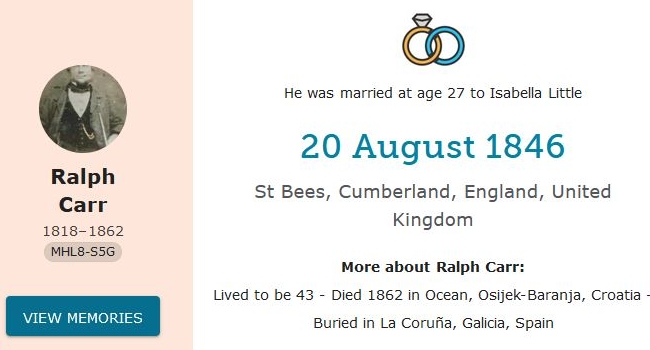
 Ralph Carr was my wife Val's great-great grandfather. He was a mariner, and died at sea. He was indeed buried at La Coruña, Galicia, Spain, because that happened to be the nearest port, but Croatia is quite a long way from Spain.

FamilySearch's algorithm seems to have translated "At Sea" to "Ocean", and then identified it with a place in Croatia.

It really is high time that the people at FamilySearch recognised that their algorithm is faulty, and stopped it moving people from town to town, from country to country, and even, in some cases, from continent to continent.


Tuesday, February 15, 2022

FamilySearch Place Names Chaos

A few months ago I posted an article about FamilySearch's "standardized place names" introducing errors (see FamilySearch Introducing Errors) but not only does nothing seem to have been done to fix the errors, but they seem to be getting worse. 

I am not talking here about errors in indexing. There are many indexing errors, some of which give rise to place name errors, especially when the original document is not available to correct it. 

The errors I am talking about here are not indexing errors but algorithmic errors, when the place name in the index is correct, or almost correct, and FamilySearch's algorithm changes it to something wrong. 

Also, FamilySearch flags many correct place names as wrong,  with warnings like !Missing Standardized Death Place, which encourage users to change a correct place name to a wrong one.

These errors can destroy the hard work of indexers, and that of family historians who have contributed to FamilySearch Family Tree. These algorithms should never have been let loose on the database before being tested to avoid such errors. 


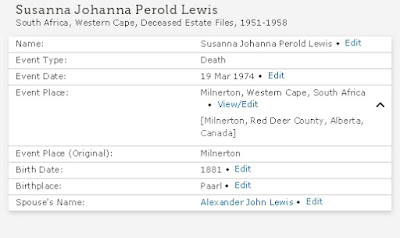
 This record, when attached to Family Tree, inserted the place name "Milnerton, Red Deer County, Alberta, Canada", which was altogether wrong. The error was not on the part of the indexer, nor on the part of the person who attached it to a record. The error was in the algorithm, which shifted the event not only to another country, but to a different continent. I copied this event to my RootsMagic database, and corrected the place to "Milnerton, Cape Province, South Africa" (which was more correct for the time of the event) and then copied it back to FamilySearch. But many people might just accept it, and copy the wrong place to their own family tree, and simply think that the family must have emigrated from South Africa to Canada. 

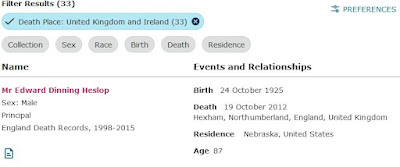
Here is another example:

In this case, it seems that large numbers of people who lived in Nebraska, USA, migrated to Northumberland, England, to die. The one shown above is just one example of many. 

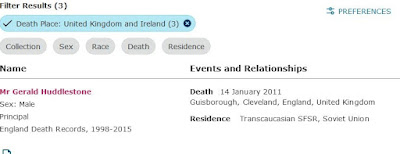
People in Trans-Caucasia, on the other hand, seemed to prefer to die in Cleveland, UK in the town of Guisborough:

These errors seem to be multiplying rapidly, and the longer the faulty algorithms stay in place, the more degraded the FamilySearch database will become.


Friday, October 29, 2021

FamilySearch introducing errors

Genealogists using FamilySearch should be aware that FamilySearch, like some other interactive genealogy web sites, has begun introducing automated errors in place names.

This is likely to affect the collaborative family tree on FamilySearch, and records copied from that to researchers' own family trees. Because the errors are automated,  they are likely to multiply rapidly, thus reducing the overall accuracy and qalue of the collaborative family tree and other records on FamilySearch. 

The errors appear to arise from the laudable desire to encourage the use of standardised place names, which makes it easier to search for places. The downside of this is that when non-standard but correct place names are changed into standardised but incorrect ones, it makes places and people much harder to find. 

One example is that in the 1841 Census of England, several people are shown as bring at St Martin, Essex. This refers to St Martin's parish in Colchester, Essex, but if one attaches such a census record as a source to a person in the collaborative tree, the FamilySearch software automatically changes the place to Chichester in Sussex, about 130 miles away. And if you then copy that record to your own family tree, the wrong place name will be copied too. 


It is, of course, possible to change it to the correct place and copy it back to FamilySearch, but many researchers, unless they have studied several generations of a family in a place, will be likely to leave it, and just assume (wrongly) that the family moved around a lot. 

One way to check in the instance I mentioned is that if the census record gives a street address, you can do a web search for the street in both towns. In this case, a search for Stockwell Street Colchester shows that there is such a street there, while searching for Stockwell Street in Chichester shows that there isn't one. But this might not work for common names like High Street or Main Street. 

Until the people at FamilySearch fix this bug, genealogists should keep a sharp lookout for erroneous place names. Standardising place names is not a bad idea, but the software should suggest such names to users, and not just change them willy nilly. 

Experienced genealogists might be capable of interpreting the various place names used by people like census enumerators, but there is no way that software programmers can interpret them, sight unseen, and they shouldn't even try. It is better to have an accurate but non-standard place name than one that is fully standardised, but wrong.


Saturday, September 05, 2020

A shirt-tail cousin, and other relationship terms

About 45 years ago I had a letter from a distant cousin on the Growdon side of the family, Monica Louise Deragowski of New Orleans in the USA. In her letter she referred to someone as a "shirt-tail cousin", and somebody else as a "kissing cousin". Those terms were unfamiliar to me, and I wondered what they meant but was too shy to ask her, even in a letter. For what it's worth she was my fourth cousin, but I wasn't sure if that made me a shirt-tail cousin or a kissing cousin. She died many years ago.

Over the years since then I've tried to find out what those terms meant, but most of the people I asked didn't know, and even web searches didn't provide a definite answer. Definitions I found were vague, and it seemed that other people were as puzzled by the term as I was -- see here A Shirt-tail Cousin | SmallTownWordNerd:
“I think he might be a shirt-tail cousin of mine,” my Dad said during a conversation about someone in town whose last name is Jaeger (as opposed to Jager). This discussion took place during my recent trip back to my hometown of Devils Lake, North Dakota, for Christmas. Shirt-tail? Say what? My Dad always seems to come up with words I haven’t heard before, or at least haven’t heard for a very long time. For example, garlic toes, which resulted in a blog post back in 2012 about making pickles with him.
But earlier this week I I was reading a doctoral thesis for which I am external examiner, and there I found the word used authoritatively by someone for whom it is a part of their active vocabulary. He was discussing two people who were first cousins once removed of the same person, but one was related to that person through his mother's side and the other through his father's side, and so they were cousins of the same person, but not blood cousins of each other. That kind of relationship, he said, was a "shirt-tail cousin". People who are cousins of the same person, but not of each other. In other words, a shirt-tail cousin is a cousin by marriage. So Monica Louise Deragowski's husband was a "shirt-tail cousin" to me.

Monica Louise Deragowski nee Growden
I've always referred to that kind of relationship as a "cousin-in-law". But, now that I know what it means, "shirt-tail cousin" will do as well. It will also do for the daughter of the first husband of the wife of my wife Val's third cousin once removed, who is a friend on Facebook. I've referred to her as my step fourth cousin-in-law, but "shirt-tail cousin" will do as well.

Now I just have to find out what "kissing cousins" are. I've had conflicting information on that. Some say they are cousins close enough to greet with a  kiss, and others that they are cousins distant enough to marry, should the kissing get enthusiastic enough. And in these days of Covid-19 you don't greet any cousins with a kiss anyway.

Kinship terms can be confusing as they vary from place to place and from culture to culture, even within the same family. Once you start moving into other languages, it becomes even more confusing. Zulu, for example, has no term to translate the English term "uncle". If it's your mother's brother, it's umalume. If it's your father's elder brother, it's ubaba, which is the same as "my father", but if it's your father's younger brother it's uyihlokazi, which translates back into English as "your aunt". And I've probably got some of the nuances wrong, for which somebody who knows more Zulu than I do please correct me!

Monday, August 24, 2020

Getting the best out of FamilySearch

On several online forums I have been reading complaints from people who are upset because they "started their family tree" on FamilySearch, and then found that someone has changed it without their permission.
The first important thing to remember here is that the proper place for your family tree is on your computer at home, and not on a remote site. There is plenty of free genealogy software out there, and two of the best programs interact easily with FamilySearch. They are RootsMagic and Legacy Family Tree, both of which have free versions, and paid-for versions with extra features. Try the free ones first, and pay for the one you like best.
With either of these programs you can log in to FamilySearch and exchange information, one piece at a time. The only person who puts anything in your tree is you.
The tree on FamilySearch is a collaborative one, which means that it doesn't belong to anyone, and anyone can contribute, and obviously some contributions will be better than others.
But for the collaboration to work properly, you need to do a few things.
  • Register with FamilySearch and include your email address.
  • If you find information that differs from yours, think twice about changing it. Check the sources first, and only if you are certain, change it.
  • It is easier to create a duplicate person and merge them later than to merge two people only to discover that they are not the same, and then have to separate them.
  • In both RootsMagic and Legacy (and also in the online version). there is a Discussion section for disputed or unclear facts. Use it.
  • There is a record trail of everyone who made any changes. If someone made a change you disagree with, ask them about it. That's why including your email address is important -- you can contact them right away, and not leave a message on FamilySearch that they will only see the next time they log in.
Those are things you should always be doing on FamilySearch.

This is my method of working for a lot of things on FamilySearch.

I keep at least two family trees on my computer. One is my Research file, which includes a lot of speculative and unrelated information. So if there are two unrelated families with the same surname living in the same place at the same time, I colour the unrelated one blue in RootsMagic. But it's there for comparison, and for eliminating people you're already looked at and found to be unrelated.

If someone sends me a Gedcom file that links to someone in my family tree, I link them, then check them on FamilySearch by looking at the link person on FamilySearch family tree. Maybe someone else has already put in their spouse and kids. But don't just copy them to your tree; check the information and sources to see how accurate they are.
 I recently found a woman named Isabel Richardson born in 1813, married in 1821, had her first child in 1822. Think about that. She cannot be the right Isobel Richardson. So what did I do?
On the FamilySearch web site I clicked Search --> Records, and asked if there was an Isabel Richardson born in that area between 1793 and 1807 (based on the dates of her oldest and youngest children. There were several, but I couldn't determine which one she was. So I left it, but left a note in the Discussion section to say that I did not think the Isabel Richardson born in 1813 could be the mother of the eldest of the children, and left it there. And, of course, I checked to see if anyone else had said anything about it in the discussion section..
That's how collaborative research works -- you spot an error, you leave a warning to other researchers, so everyone should be helping everyone.
Or, having linked the person in my tree with one on FamilySearch, I may have a spouse and kids. If I'm reasonably certain off the accuracy, I copy them to FamilySearch, then go to the web site and look for research hints. If there aren't any, I go to the "Record-->Search" (see above) and search for one of them in the general or specific area. I usually add a year or two on either side of their given birth date, which often finds ones that the "hints" miss. If name, date and place match, then I add that source and info to mine. Sometimes you can't find the parents, but you can find them through a child.
If the place name spelling is different, then I do a web search for it. And sometimes boundaries change, so I try to use the description closest to the date of the event in the life of the person concerned.
There also some pitfalls to watch out for. Many records have been transcribed by volunteers, and some, perhaps by paid people who did not know much about genealogy. In several records, the name of the record office where the records are or were kept is used in the transcription for the name of the place where the people lived or an event took place. A lot of people are thus said to have married in Cumbria, England United Kingdom, which did not exist as a place before 1974, and just happens to be the place where the marriage record is kept, but was not where the marriage actually took place.
Or people are said to have died in Grahamstown, Eastern Cape, South Africa, because that is where their wills were processed after they had died, even if the place where they died was hundreds of miles away. If there is an image of the original document, you may find the actual place of marriage or death from that, otherwise you might need to look for it in other sources. FamilySearch is often unhelpful here, showing you the less reliable records first. But a resourceful genealogist will usually find a workaround.

Friday, January 10, 2020

Rootsweb genealogy mailing lists to close

The announcement was made almost secretively: Rootsweb mailing lists for genealogists will be closing on 2 March 2020.

For three decades Rootsweb has hosted mailing lists for genealogists and enabled them to communicate with others around the world and to collaborate in grenealogy and family history research. For more than half the time those mailing lists have been administered by a commercial firm, Ancestry.com, which has now decided to pull the plug.

This comes only two months after YahooGroups, another host of mailing lists, made a similar announcement, though a change of management at Yahoo had already resulted in a partial crippling of YahooGroups in 2013.

One result of the Yahoo! debacle was the formation of groups.io, which offers a new and improved version of the YahooGroups format, and with the impending closing of Rootsweb many of the Rootsweb mailing lists will be taking refuge there as well.

On the positive side, there will probably be a weeding out and streamlining of  of genealogy mailing lists.

For example, there were about a dozen mailing lists on Rootsweb related to specific areas of South Africa, with fairly sparse traffic. groups.io makes it possible to have subgroups, so we are encouraging people to join a new list for the whole of Africa, and we can open subgroups for different regions, but only if traffic from those regions gets too heavy.

You can see the African list here:

https://groups.io/g/afgen

and there are also discussions about consolidating various northwest England groups on Rootsweb (Cumbria, Cumberland, UK-Northwest) into a new one on groups io.

The Rootsmagic-users group, for support of users of the genealogy program Rootsmagic, has already opened a new list on groups.io, and no doubt others will soon do the same.

The bad news is that thirty years of archives will effectively be lost. 

For thirty years people have been sharing their research on genealogy mailing lists. Many of the people who collected that information are now dead, and much of their work will be lost.

Among the more useful items  were online discussions about published family trees, noting inaccuracies in them and often providing corrections.

Rootsweb was originally an amateur effort, but grew so large that amateurs could not afford the time or the money to maintain the servers and negotiated with Ancestry.com to take over the administration on condition that Rootsweb would always remain free. Perhaps, in hindsight, that wasn't a good idea, and it might have been better to set up a kind of non-profit trust, but it's far too late to think of that now.

But there is hope in the migration to groups.io, and I only hope that it will be done with consultation, and with weeding out and consolidation of duplicate, overlapping and redundant mailing lists.

Some have sugested that Rootsweb group members should migrate to social media web formats like Facebook groups, but though such forums are popular, they are far less efficient or effective than mailing lists. Because of Facebook's algorithms, one is quite likely to miss the most useful and relevant messages altogether. With mailing lists you decide what is relevant, but on Facebook, it is Facebook's algorithm that decides what it will and will not show you. And finding a message again after a couple of days is often an enormously time-consuming task.

I mentioned that the announcement of the closing of Rootsweb was made almost secretively. A web search revealed not a single news article about it. So if you were concerned enough about it to read this far, please help it better known by sharing this article on social media too -- there are little buttons you can click at the bottom of the article to do so.


Tuesday, December 31, 2019

Put not your trust in the Internet to keep your data safe

Over the last decade I've noticed a change in the way people speak of genealogy software. In the past we assumed that the software was on our computer, as was the data, and people would be warned of the need to keep backups off site in case of fire, theft or other disasters.

Now more and more people seem to assume that your data will only be on a remote site, and will not be on your computer at all. They assume that in order to "start a family tree" you need to subscribe to some or other company like Ancestry.com. It seems not to occur to many people that it is even possible to "start a family tree" using your own software on your own computer.

So now the danger is reversed. In the past you were advised to "keep a backup in the Cloud, just to be on the safe side." But how safe is that? How safe is your data in the cloud?

The recent closure of YahooGroups shows that it is not at all safe. See this article: The Old Internet Died And We Watched And Did Nothing:
Most likely, you have some photos that are lost somewhere, some old posts to a message board or something you wrote on a friend’s wall, some bits of yourself that you put out there on the internet during the previous decade that is simply gone forever.
The internet of the 2010s will be defined by social media’s role in the 2016 election, the rise of extremism, and the fallout from privacy scandals like Cambridge Analytica. But there’s another, more minor theme to the decade: the gradual dismantling and dissolution of an older internet culture.
This purge comes in two forms: sites or services shutting down or transforming their business models. Despite the constant flurries of social startups (Vine! Snapchat! TikTok! Ello! Meerkat! Peach! Path! Yo!), when the dust was blown off the chisel, the 2010s revealed that the content you made — your photos, your writing, your texts, emails, and DMs — is almost exclusively in the hands of the biggest tech companies: Facebook, Google, Microsoft, Amazon, or Apple.
The rest? Who knows? I hate to tell you, but there’s a good chance it’s gone forever.
Though that article does not mention any specific genealogy sites, the principle is the same. And there were numerous family history groups on YahooGroups where people shared their family history data and their research, and advised each other on sources and resources. And now it's going, going, gone.

So if you want to "start a family tree", don't ask which is the best web site to do so. You don't need to subscribe to a web site to start a family tree! Ask rather "Which is the best family tree software for my computer and operating system?"

At the time of writing my recommendation for genealogy programs is Rootsmagic, or Legacy.


By all means back up your data in "the Cloud", but keep your primary data on your computer at home, where you can control it.

Sunday, June 23, 2019

HISTORY OF CAMISSA PEOPLE | Camissa People

HISTORY OF CAMISSA PEOPLE | Camissa People:
All over Africa and its Island countries in every port city there are populations of African-Creole people who are a multi-ethnic mix with the major part of their ancestral heritage and culture being African. But as a result of the slave trade and maritime traffic on the Atlantic and Indian Ocean coastlines they also have in their genealogical and genetic ancestral-cultural heritage a mix of African, Indian, Arab, Southeast Asian, and Chinese and European roots. Under British colonial administration from 1911 people with this ancestry who have over 150 tributaries to their ancestral heritage were forcibly assimilated into one ‘race-silo’ labelled COLOURED and de-Africanised by colonial decree.
It should be borne in mind, however, that while all people described in this article as "Camissa" were labelled "Coloured", not all people labelled "Coloured" fit the Camissa description of the article, and that could lead to some confusion.

Confusion is also caused by the use of terms like "the Coloured community", as if labelling automatically creates community. It is also important to be aware of the distinction between genetic and cultural heritage. For example, "Camissa" does not appear to include people like the descendants of John Dunn, who are of Anglo-Zulu heritage, and though classified as "Coloured" during the apartheid era, would have had a different cultural heritage from the Camissa of the Cape.

 Also, a child born in Johannesburg 2001 of a Nigerian father and a Ukrainian mother might be classified as "Coloured" even in the post-apartheid era, but could not be said to belong to a Coloured "community", either culturally or genetically, and from a genealogical point of view, searching for "Camissa" ancestry for such a person could quickly lead to a dead end.

One of my wife's ancestors was a slave known as Francina van de Kaap, so she would probably fit the  Camissa description, but we haven't a clue about Francina's ancestry. "Van de Kaap" just means that she was born there, but her ancestors could have come from almost anywhere. Perhaps DNA testing could give a clue, but that is very expensive. Francina has many descendants alive today, most of whom are classified as "white", and wouldn't think of themselves as Camissa.

So from a genealogical point of view the Camissa description is a two-edged sword; it could help to clarify some things, but could also lead to more confusion.

Wednesday, June 05, 2019

New Irish historical birth, marriage and death registers available online for public to access

New historical birth, marriage and death registers available online for public to access:
These records hold the births for 1917 and 1918, marriages from 1864 to 1869, 1942 and 1943 and deaths for 1967 and 1968. The release is part of an initiative by both departments to provide online access to historical records and registers compiled by the Civil Registration Service. The records – which were prepared by the Civil Registration Service and uploaded by the Department of Culture, Heritage and the Gaeltacht – can be accessed on the website www.irishgenealogy.ie.

Wednesday, May 29, 2019

270 Canadian obituary links

For those researching Canadian genealogy, here are some links to online obitiaries and obituary indexes. Blog - The Ancestor Hunt: During May, 2019 I have been updating the links to online obituary and obituary index collections that are available to search for free. There are a total of 270 online database links that I have found for Canada. Of these, 87 have been added since the previous update. So not only can we search old newspapers for these gems, we sometimes can get transcriptions and clippings and also get directed to the location of the obituaries from obituary indexes.

Tuesday, February 26, 2019

Organizing your family history research with Zotero - Organize Your Family History

Organizing your family history research with Zotero - Organize Your Family History:
Zotero is great for genealogy for all of these reasons and more:

  • It is free, with the stability and support of a university backing it up.
  • Even if you are syncing to the Zotero cloud, you can do that for years on free storage, before you have to buy some. And when you do buy storage, it’s inexpensive and unlimited.
  • It provides the structure missing from tools like OneNote and EverNote, but brings substantial flexibility, along with the structure.
  • It can add most catalogued online source citations to your Zotero library with one click.
    It can organize and provide one-click access to the thousands of documents, spreadsheets, photographs, and other files you have saved to your hard drive. In essence, it can draw all those files together into a uniform, organized system.
  • Zotero becomes your door to all you have collected.
    It allows you to create a record once but to file it in as many folders as you want without taking up significant extra space. You make a change once, and it changes in every folder.
  • You can find things rapidly, even if you only have vague memories of having long ago found a document that might be of use in solving a new genealogical problem.
    It will sync to the cloud, allowing you to access your work at Zotero.org, wherever you have Wifi access.

Thursday, October 18, 2018

Debunking Genetic Astrology

Debunking Genetic Astrology:
We have created these web pages to help interested non-scientists to be skeptical consumers of genetic ancestry information, and to try to distinguish genetic ancestry from genetic astrology. We highlight some of the doubtful claims that have been brought to our attention: scientific-sounding claims that we think are flawed, exaggerated or not well supported by the evidence, and that appear to be driven by a commercial motive or some agenda other than the advancement of knowledge. We also aim to help readers find some of the best available scientific evidence, and provide an overview of what can and can't be said about genetic ancestry.

Monday, April 16, 2018

FamilySearch comes of age

In the last couple of years FamilySearch has completely changed the way I do my genealogy research. I now spend most of my research time comparing records in FamilySearch with what I already have, and reconstituting families from FamilySearch data.

It wasn't always like this.

FamilySearch has had its ups and down over the years, and sometimes useful features have been withdrawn and not replaced for some time. There are remnants of that in a poll in the sidebar of this blog. One useful feature recently withdrawn was the "Search Results", which I hope returns before long.

But what makes FamilySearch more useful now is its integration with programs like RootsMagic and Legacy Family Tree.

The main hindrance to this usefulness is the "My Tree" attitude of many genealogists. There are many web sites that allow you to put your family tree on line where it can be seen by others. Some are static, and are difficult to update. Others are dynamic. But most of them are not collaborative. And people who have become used to that model are suspicious of collaborative projects like FamilySearch, because they don't like the idea of anybody else changing anything in "My Tree".

In the days when Ancestry.com had a free version called Mundia, I used to refer to it quite a lot. It followed the "My Tree" model, and so you could find multiple versions of the same family on line. It also encouraged people to uncritically copy information to their own tree from others' trees. This uncritical copying often resulted in errors being multiplied. The majority was not always right. An inaccurate tree could be copied 10 times, and the accurate version could be copied only once or twice. You could follow the majority version, but it would be wrong. For some examples, see Jane Ellwood and the perils of online family trees, and Three Agnes Ellwoods -- Tombstone Tuesday.

FamilySearch still lets you have your tree, which no one else can alter. But the place for your tree is on your computer. You alone decide if you want to copy information from FamilySearch to your computer, so nobody else can alter your tree. But you can also share your research with others by copying information from your tree to FamilySearch.

So this is what I do now.

I look at my "Research" file on my computer, which is a copy of my "Main" file (where I keep mainly verified information). The Research file is more speculative, where I add possible links to be followed and verified later and so on.

I find a family that I have not looked at for some time, and check it with FamilySearch, comparing the two records side by side.

Sometimes I find someone has added information that I did not have -- parents of s spouse, for example. If they look likely I copy them to my Research file (not to my Main file at this stage).

I then click on the link to FamilySearch in my genealogy program and log in to FamilySearch on my web browser. That brings up the same family. For each member of the family there FamilySearch may bring up "Research Hints". These are the best research hints in the business. The suggestions are not always accurate, but in my experience they are right about 80% of the time.

For example, it may suggest a link to the person in one or more censuses. You are then offered the opportunity to attach the census record to that person as a source. That will also create a "Residence" event for that person in FamilySearch, which you can also copy to your own tree on your computer if you wish. The census records are often transcriptions, so need to be taken with a pinch of salt. There may be mistranscriptions and spelling errors, but you can make a note of these.

You may find that someone has already attached this source to another person. There are then three possibilities. One is that they have attached to to the wrong person. Another is that they have attached it to the right person but it is not the person you are looking for. A third, and the most common, is that the person they have attached it to is a duplicate of the person you want to attach it to. If that is the case, FamilySearch offers you the possibility of merging the duplicate people.

If you are sure that they are the same person, merge them. If you have doubts, you can contact the person who attached the record to discuss it with them. FamilySearch has a research trail, showing every change made by anyone, so that you can contact other users (sometimes a long-lost cousin). When you register to use FamilySearch, your record contains your contact information, which can include your e-mail address. I recommend that you include that, so that people can contact you about shared family members.

There is also, both on the FamilySearch web site and in the programs that link to it, a place where you can have discussions about problems relating to a particular person in your tree. Thus you can query information that someone else has added, that you think may not be accurate, or you can query discrepancies in records.

There are things to be careful of. For example, FamilySearch has lots of church baptism records from the Church of England. These have been transcribed from microfilms of the original registers, and sometimes two or more microfilms were made of the same register. The microfilms and the transcriptions made from them, vary in quality. One particular error is that the transcriber often included as a "Residence" the location of the parish where a baptism took place, rather than one taken from the "Abode" field in the register.  Where this is apparent I usually don't copy the "residence" information, and am careful about assuming that the place of baptism was the place of birth. Sometimes a census will show that the date of birth was different. This is the kind of thing you can add to the "Discussion" field.

In working like this with FamilySearch I'm usually adding several new people to my family tree each day, even if they are only seventh cousins. I am also organising scattered individuals on FamilySearch into families, which helps make it more useful for other members. And there's more than enough there to keep me busy for the rest of my life.

One of the questions that sometimes bothers genealogists is what happens to their research when they die, especially if no one in their immediate family is interested. But if you share your research on FamilySearch, it is there for others to make use of and add to, long after you are dead.

So drop the "My Tree" approach, and rather join the larger human family.

Wednesday, March 28, 2018

Ancestry Isn't the Only Genealogy Site With Record Hints

An interesting article about genealogy record sites that offer hints -- suggestions about links to families that may be useful in your genealogical research. One of the first that they mention, apart from Ancestry.com, is FamilySearch, and that is one that I can recommend. Ancestry Isn't the Only Genealogy Site With Record Hints:
FamilySearch offers the largest database of free genealogy records on the web, as well as numerous other collections that are available to view digitally at a Family History Center. In fact, many of Ancestry’s indexes are pulled from the original records of FamilySearch. FamilySearch can be searched at no cost and the records viewed by anyone. They also offer an enormous, collaborative family tree and those who use it can take advantage of hints from FamilySearch’s databases.
I've never had much use for Ancestry.com. For a start, as a pensioner I just can't afford it, though we did at one time make use of their free Ancestry Lite version called Mundia until it was withdrawn. It gave access to Ancestry public trees, which could be useful, though it was, as this article warns, important to be on your guard, because there are a lot of very inaccurate family trees on Ancestry.

For example, Three Agnes Ellwoods: Tombstone Tuesday | Hayes & Greene family history: we discovered a lot of online family trees for Agnes Ellwood Tallon, on the soon-to-be-closed Mundia site (no links, as they won’t work after September). And every one that we looked at linked to the wrong Agnes!

The Family History Daily site  also publishes somewhat misleading information by confusing genealogy programs (which run on your computer and help you to record your genealogy) and genealogy web sites (to which you can upload a copy of your family tree). They do acknowledge that they get paid to write about some of the sites that they write about, but by blurring the distinction between progams and web sites they are confusing a lot of people.

So regardless of what they say, I will maintain that the best online family tree site is FamilySearch. I have grave reservations about Geni.com and MyHeritage -- the latter has some distinctly dubious business practices.


In general, I've found FamilySearch's hints to be both useful and usable. Of course the usual warnings apply -- check and verify them with other sources. And FamilySearch also has the advantage of having a single public tree. Some people seem to get quite upset at the notion of not having "my tree" on a remote public site, as they can do with sites like Ancestry.com, but that is a bit silly, because the place for "my tree" is on my computer, not on a remote site (other than for backup, of course).

The advantage with FamilySearch is that at least two genealogy programs, RootsMagic and Legacy Family Tree, will interact with the family tree, and let you compare your information with that on the public tree, and copy it either way. If there are disputed pieces of information (different dates of birth, for example), you can start a discussion about it, which you can see on your computer, and others can see on theirs, or on the FamilySearch site itself.

In addition, every change that anyone makes is tagged, showing who made it and when. You can put your contact information in the tag (e-mail address etc) so that anyone who has conflicting information or wants to ask more can contact you directly. This is usually much more difficult on the commercial sites -- you have to go through the site to contact others, and you sometimes have to be a paid-up member to do so.

Also, if you find that a hint on FamilySearch isn't useful, or is misleading, you can leave a comment on it, and say why you think it isn't a match, and in that way help other researchers.

Sometimes the people at FamilySearch make "improvements" that don't really improve things, and make the site more difficult to use, but eventually they seem to discover those, and generally it's getting better all the time. 


Thursday, February 08, 2018

African genealogy and Rootsweb mailing lists

It seems that the Rootsweb genealogy mailing list servers are down
again. There are several mailing lists dealing with genealogy in
various parts of Africa that have been affected by this.

This is a reminder about the African genealogy and family history
discussion forum, which is not part of Rootsweb and so has not been
affected. It is a continent-wide list, for discussing genealogy and
family history in any part of the African continent. 

Visit the forum web page at:

http://groups.yahoo.com/group/afgen/

for more information, and if you know anyone else who may be
interested, please invite them to do so as well.

Group Email Addresses

Main web page:  http://groups.yahoo.com/group/afgen/
Post message:     afgen@yahoogroups.com
Subscribe:     afgen-subscribe@yahoogroups.com
Unsubscribe:     afgen-unsubscribe@yahoogroups.com
List owner:     afgen-owner@yahoogroups.com

If you do not want to be a member of Yahoo! you can still subscribe to
the mailing list by sending e-mail to:

afgen-subscribe@yahoogroups.com

with the word SUBSCRIBE in the subject line and on the first line of
the message.

If you do have a Yahoo! Id you can go to the web page and edit your
membership, though the people at Yahoo! try to make if very hard for members to do so, as if you follow the link they will often take you to a different web page instead, so you may find it easier just to subscribe to the list.


Steve Hayes
Moderator of the African Genealogy Discussion Forum

Wednesday, December 20, 2017

FamilySearch just got harder to use

Recent changes to FamilySearch seem to have made it harder to use. These are two of the changes that make life more difficult for me, at least, in using FamilySearch for research, especially in census records.

  1. Previously, when searching for a particular person, it used to be possible to look at a record, and then go back to "Search Results" to look at another record in the set. Now, it seems that there is no way to do this, and one has to re-enter the search query each time.
  2. Previously it was possible to copy the record found in a search, and paste it to a document more or less as is. Now, if one does this, the document requires a lot of editing in order to be able to print it out and compare it with other records, because information that appears on one line on the screen now appears on several consecutive lines in the pasted document.
Or am I missing something? Is there still a way to do those two things that I just haven't noticed yet?

Has anyone noticed any other problems, or anything that has been improved?

Update 11 Jan 2018

After further "improvements" it has got worse.

Previously, after linking a record to the family tree, it was possible to go back to the same person in the family tree and continue from there. But now it takes you back to the "base person". And it stakes up to 10 clicks (+ waiting 30 seconds or more for the screen to reload each time) to get back to where you were to continue working. .


Thursday, November 09, 2017

New Find-a-Grave site is fashionably illegible

The last couple of times I have gone to the Find-a-Grave site I have been taken to the "new" site, and have quickly switched back to the old one, because the new one is much more difficult to use. I am sorry to see that the old one is to be retired soon, because, whatever its other faults, it is at least legible on screen.

It seems to be fashionable among web designers nowadays to make their pages as difficult to read as possible, and the new Find-a-Grave site is no exception to this, and is a particularly egregious example.

After battling to make out what was written on the new site, the moment I switched to the old one everything became clear. This is in spite of the fact that the old site uses a smaller font size than the new one. The difference in legibility is due to the better contrast between text and background on the old site, and also the greater thickness of the letters.

So if one is measuring the site by "user experience", I would rate the old site at 55% and the new one at 5%. The main user experience is frustration at trying to puzzle out what is written on the screen.

The new site may bring oohs and aahs from other 20-something web designers, because it follows all the fashionable trends. But spare a thought for the poor suckers who actually want to use the site. Many of us are over 60, and our eyesight is not what it was when we were 20.

PS My wife looked at the new site on her computer and found it easier to read than I did on my computer. Perhaps if you have one of those old-fashioned monitors with little knurled knobs that you can use for adjusting brightness and contrast you could fiddle with them until some of the presently illegible text might become readable, but my flat-screen Samsung monitor has automatic adjustment of brightness and contrast, so I'm stuck with it. And the fact remains that the old site is perfectly legible to me, and large parts of the new one are not legible, using exactly the same computer and monitor. So I can say unequivocally that the new site is designed to give a very bad user experience. I can't even make out the words on the screen wearing two pairs of glasses and holding a magnifying glass up to the screen.


Wednesday, August 23, 2017

Natal marriages in FamilySearch

I've recently being following up some of the "hints" on FamilySearch for possible connections.

Among the records in the "hints" were "Natal Civil Marriages", and at first I rejoiced because they appeared to give an actual date of marriage, whereas I had only had a month and a year.

But on reflection it seems to me that these "marriage dates" are misleading. About 25 years ago I think I looked at some of these records in the Natal Archives and if I recall correctly they are not marriage registers but marriage notifications, and the date recorded is the date of the notification, not the date of the marriage.

This seemed to be confirmed for me when one couple were shown as having married on 8 Oct 1886, but their ante-nuptial contract was only signed on 22 October, which means they could only have got married after the latter date.

Update 24 August 2017

On checking the records concerned again, with a different link for which an image was available, it seems that it was indeed from the original register, so the date is correct. It appears that the couple concerned had a post-nuptial ante-nuptial contract -- they were married on 8 October 1891, and their ante-nuptial was dated 22 October.

The other misleading thing is that it was in fact a church marriage, and not a civil marriage.

So this record at least was indeed from the original registers, and not from the "marriage notifications" in the Natal Archives.

Friday, August 11, 2017

Can HistoryLines Really Build an Instant Personal History of Your Ancestors?

when I read this, I was rather sceptical, and thought it was one ofn those "too good to be true" things Can HistoryLines Really Build an Instant Personal History of Your Ancestors?:
The HistoryLines website bills itself as “Instant Personal History.” Those of us who love family history get really excited when we think we can get a lot of valuable information quick and easy. So at first glance HistoryLines can seem a little disappointing. Instant personal history may be overselling it. But, like any good tool, the more you put into it the more you get out. And on second glance, HistoryLines is a good tool.
But since they offered a free trial, I thought I'd have a look, and, as I suspected, it offered a time line and some boilerplate text.

The first one I chose was my great great grandfather John Bagot Cottam (1836-1911). He was born in Salford, Lancashire, England, and emigrated to Natal in 1863, with his wife Adelaide Herbert (1831-1909) and three daughters. They had more daughters in Durban where he died in 1911.

Now it's possible that the paid-for version offers a bit more, but the free version asks for the first name and surname, date and place of birth and death, and sex of the person and that's all. If it asked for a couple of residence dates and places, or an emigration date and place, it might have been able to come up with more relevant boilerplate information, but it didn't.

It did have the First and Second Anglo-Boer Wars, but failed to mention the Union of South Africa in 1910. It also failed to mention the American Civil War. But why should it, if he was born in England and died in South Africa and was never in the USA?

In the case of John Bagot Cottam, however, that was probably a relevant fact. He emigrated to Natal in 1863 to be accountant to the Natal Cotton Plantation Company. Cotton planting never took off in Natal, but in 1863 the cotton mills of Manchester were desperately looking for alternative sources of raw cotton, since the US Civil War had made the American supply dry up.

If HistoryLines had come up with something like that, I might have seriously considered paying for it. But one can probably get more relevant results by doing your own Google searches using the dates in your family member's time line.

The second test was not a direct ancestor, but a relation who lived in the USA. I thought that as HistoryLines was an American project, it might do better with people in the US, so I thought that to be fair I should try one.

The one I chose was William Nelson Growden (1893-1979). He was born in Tennessee, died in Los Angeles, but spent most of his adult life in Alaska. He lived in Ruby, Alaska, and was in government service, and was at one time a member of the Alaska Territorial House of Representatives.

Again, perhaps if HistoryLines had correlated residence information it might have come up with more relevant boilerplate text, but as it was it did not mention the earthquake and tsunami in Valdez, Alaska, in 1964, which killed William Nelson Growden's youngest son and two of his grandchildren.

So no, though it sounds good in the blurb, I'm not tempted by this one.